Contractor access that expires — and proves it did.
Grant contractors time-boxed access to the apps you already run, then let Tempkey revoke it at the deadline, confirm it with the provider, and hand you the audit trail.
For example: give a freelancer access to Slack, Drive, and GitHub for six weeks. On week seven, Tempkey takes it back — and shows you it’s gone. That’s a grant: one contractor’s access, with an end date.
Free plan · no credit card · bring your own tokens.
See it in your dashboard
A real Tempkey workspace: contractors, per-tool status, and what happens when something can’t be verified.
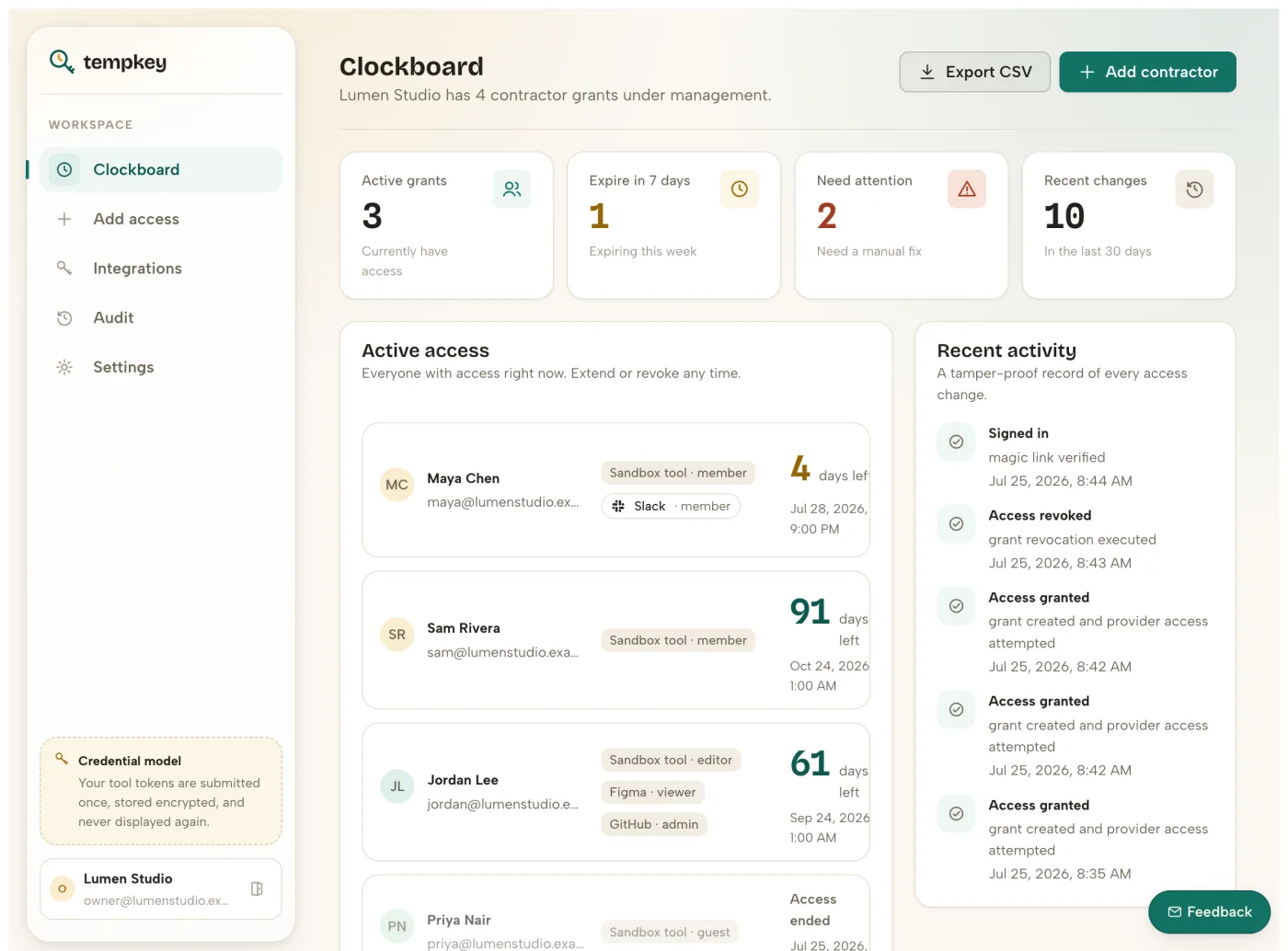
“Done” means verified, not “request sent”
After every revoke — automatic or manual — Tempkey reads the provider’s state back and confirms access is gone before it closes the grant.
One timer instead of six consoles
Contractors often touch 4–6 SaaS tools. Tempkey replaces scattered calendar reminders with a single expiry clock across all of them.
Priced for contractors, not headcount
Flat plans metered by active contractor grants, with your own admin tokens — no per-employee lifecycle suite required.
How it works
Four steps, no IT rollout.
Connect tools
Bring your own admin API credentials. Secrets are write-only in the browser and encrypted by the backend.
Grant access
Add the contractor, choose tools and permissions, and set 7/30/60/90-day access windows.
Warn before expiry
Notification scheduling is workspace-configurable so handoff happens before the clock hits zero.
Revoke and verify
Tempkey executes revocation, reads back provider state, and records append-only audit evidence.
If a provider’s API is unreachable or a permission can’t be removed, Tempkey flags it in your dashboard and audit log instead of silently closing the grant. “Done” means Tempkey read the provider’s state back and confirmed it — not that a request was sent.
Works with the tools you already hand out
GitHub, GitLab, Figma, Dropbox, Asana, Slack, Google Workspace, Microsoft 365, Zoom, and AWS IAM fully automated — Notion, and Trello with lighter-touch tracking — plus Zapier and Make bridges for everything else.
Tempkey meters the thing you actually manage: active contractor grants, not headcount.
Pricing, in one screen
Flat per active contractor grant. No annual minimums, no per-seat surprise.
Try the full grant-to-revoke loop before you trust it with a real contractor roster.
- 2 active contractor grants
- Up to 2 connected integrations
The default for small agencies and studios running a steady stream of contractors.
- 10 active contractor grants — up from 2
- All 10 natively enforced integrations — up from 2
For teams running larger or overlapping contractor rosters across every connected tool.
- 30 active contractor grants — up from 10
- All 12 integrations, including Zapier/Make bridges
Tempkey is built by one named founder, not a faceless team — see the about page for who and why, the changelog for what’s shipped recently, and the API docs for the most concrete proof the product is real.
Questions people ask first
What does Tempkey actually do?
Tempkey grants a contractor access to your work tools with a built-in expiry date, then automatically revokes that access when it ends and confirms the revoke actually took effect.
Is Tempkey for contractors only, or employees too?
Tempkey is purpose-built for time-boxed access — contractors, freelancers, agency staff, and short-term hires. It isn’t designed to replace full employee lifecycle/HRIS systems.
How does revoke verification work?
When a grant expires or is revoked manually, Tempkey calls the provider’s API to remove access, then reads the provider’s state back to confirm the removal actually succeeded before marking the grant closed.
What happens if a revoke fails?
A failed or partial revoke is flagged clearly in the dashboard and audit log rather than silently marked complete, so the workspace owner knows exactly what still needs manual attention.